

ActiveCampaign DKIM Setup
DKIM (DomainKeys Identified Mail) is an email authentication method that adds a digital signature to every message sent from your domain. This signature allows receiving mail servers to verify that the email hasn’t been tampered with in transit and was genuinely sent from your domain. Setting up DKIM helps improve deliverability and protects your brand from spoofing and phishing attacks.
ActiveCampaign is a customer experience automation platform that combines email marketing, marketing automation, and CRM tools to help businesses engage and grow their audience.
This guide will walk you through the steps to configure DKIM for your domain when using ActiveCampaign as your email service provider.
ActiveCampaign DKIM Requirements
In your ActiveCampaign Interface, follow these steps
- 1. Click “Settings.”
- Click “Advanced.”
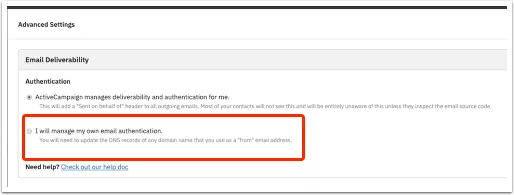
- Click “I will manage my own email authentication.”
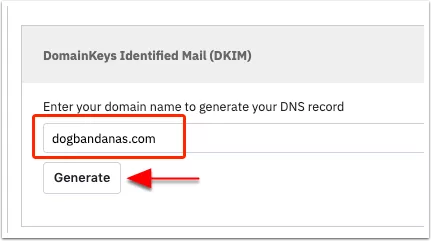
- Type your sending domain into the DomainKeys Identified Mail (DKIM) field and click the “Generate” button.
- ActiveCampaign will generate a TXT Record Name and TXT Record Value.
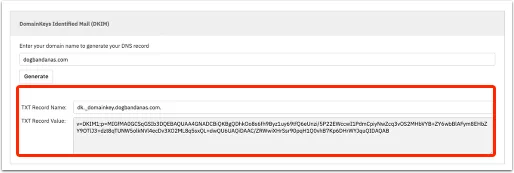
- Add these entries into Sendmarc’s DKIM Management if you’re making use of it. Otherwise, add the keys directly into your DNS host.
Your DNS host is typically the company you registered your domain with or host your website through.
How to update your DKIM settings using Sendmarc
To update your DKIM record through Sendmarc, please refer to the Sendmarc DKIM Setup Documentation.
ActiveCampaign’s Documentation
ActiveCampaign’s official DKIM configuration guide can be found here.
Looking for SPF Settings?
Find out how to configure your ActiveCampaign SPF settings here.